Employees are pasting your most valuable IP into AI tools. Our inline controls detect and block PII, credentials, source code, and financial data before it leaves the browser.
Traditional DLP tools were not built for generative AI. They cannot meaningfully prevent data leakage without blocking everything.
Developers paste API keys, connection strings, and environment variables into ChatGPT for debugging. These credentials end up in AI training data.
Customer data, employee records, and personal information get pasted into AI tools for analysis or content generation, violating GDPR and privacy regulations.
Proprietary algorithms, business logic, and trade secrets are shared with AI assistants for code review, documentation, or debugging.
Our browser extension analyzes content locally before it's submitted to AI services. Detect sensitive data patterns and enforce policies without blocking productivity.

Detect API keys (AWS, OpenAI, GitHub, Stripe), JWT tokens, private keys, connection strings, and environment variables before submission.
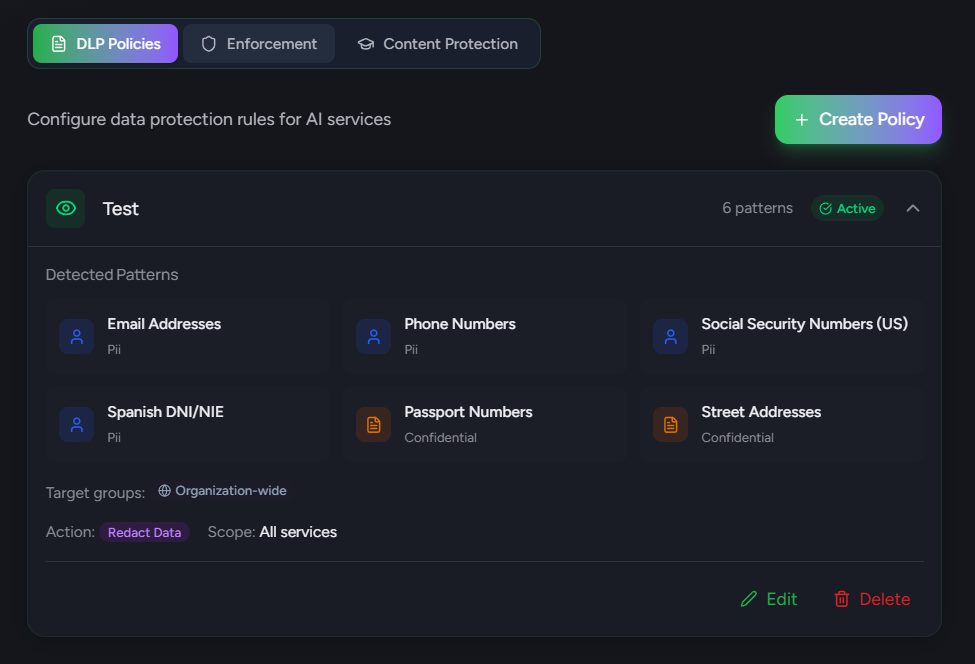
Identify emails, phone numbers, SSN, DNI/NIE (Spanish), passports, addresses, and other personally identifiable information across all AI services.
Recognize function definitions, class declarations, import statements, and other code patterns that indicate proprietary source code.
Detect credit card numbers, IBAN, bank account numbers, and financial transaction data before it reaches AI services.
Create custom regex patterns for organization-specific sensitive data like project codes, internal identifiers, or confidential markers.
Track DLP violations by type, service, user, and time. Identify hotspots and trends to improve policies and training.
Show users exactly what will be redacted before submission. They see original vs. redacted side-by-side and can accept, edit, or cancel—full transparency with control.
Scan pasted content in real-time before it reaches the AI service. Detect sensitive data from copy-paste operations—the most common way data leaks occur.
Intercept file picker dialogs and validate files against DLP policies before upload. Block sensitive documents, images with metadata, or prohibited file types automatically.
Run DLP scanning without user-visible UI for audit purposes. Useful for initial assessment before enforcing policies—understand the scope of the problem first.
All DLP pattern matching happens locally in under 200ms. No prompt content ever leaves the browser or reaches our servers—true privacy-first data protection.
Apply DLP rules only to specific AI services. Block credentials in ChatGPT but allow in approved enterprise tools like GitHub Copilot. Full granular control over which services enforce which policies.
Block users on free tiers while allowing enterprise subscriptions. ChatGPT Enterprise has training opt-out—permit it while blocking ChatGPT Free. Compliance-ready tier enforcement.
We include 20+ patterns covering: PII (emails, phones, SSN, DNI/NIE, passports), credentials (AWS/OpenAI/GitHub API keys, JWT tokens, private keys), financial data (credit cards, IBAN, bank accounts), source code patterns, and confidential markers. All patterns are optimized for low false-positive rates.
Warn shows a notification to the user explaining what sensitive data was detected, but allows them to proceed. Block prevents the prompt from being submitted entirely and shows a message explaining why. Both actions log the event for audit purposes without storing the actual content.
Yes! Professional and Enterprise plans allow you to create custom regex patterns. You can define patterns for organization-specific data like project codes (e.g., PROJ-\\d{6}), internal identifiers, or confidential document markers. Each pattern can have its own severity level and action.
Based on your policy settings, we can: Log the event silently for audit, Warn the user with an explanation, Block the submission entirely, or Redact the sensitive data before allowing submission. All violations are recorded in your dashboard with metadata (not content) for compliance reporting.
Deploy intelligent DLP controls that understand AI workflows. Prevent data leaks while enabling safe AI adoption.